How to Download a YouTube Thumbnail in Full HD
Quick answer: the fastest way is our free YouTube Thumbnail Downloader — paste the link, pick the size, click download. Prefer to do it by hand? Open https://i.ytimg.com/vi/VIDEO_ID/maxresdefault.jpg and save the image. Both give you the original up to 1280×720.
Whether you want to archive your own thumbnails, study what's working in your niche, or pull a reference for a new design, downloading a YouTube thumbnail takes about five seconds once you know how. Here are both methods — the easy one and the manual one.
Method 1 — the one-click downloader (easiest)
Use our free YouTube Thumbnail Downloader. No sign-up, no watermark:
- Copy the video's link (from the address bar, or the Share button).
- Paste it into the tool and click Get thumbnails.
- Every available resolution appears with a preview — click Download under the size you want.
It works with normal videos, Shorts, youtu.be short links, or even just the 11-character video ID. The tool also shows the video's title and skips any resolution the video doesn't have.
Grab any thumbnail right now — free, no sign-up.
Open the Thumbnail Downloader →Method 2 — the manual URL trick
Every YouTube thumbnail lives at a predictable address. You just need the video's 11-character ID — the part after v= (or after youtu.be/). Drop it into this pattern:
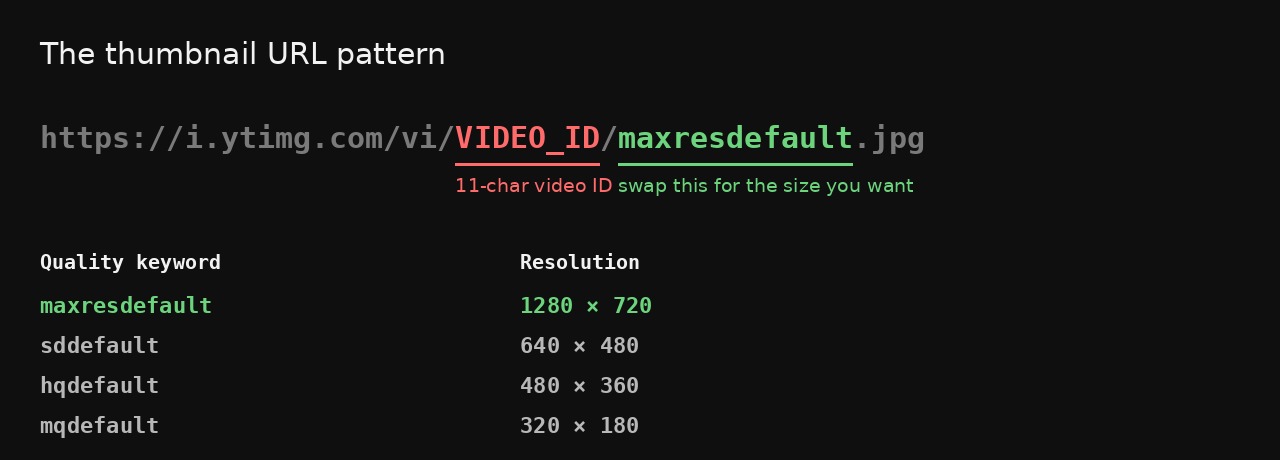
For example, for youtube.com/watch?v=dQw4w9WgXcQ, open:
https://i.ytimg.com/vi/dQw4w9WgXcQ/maxresdefault.jpg
Then right-click the image → Save image as… Change the keyword at the end for a different size:
| Keyword | Resolution | Shape | Notes |
|---|---|---|---|
maxresdefault | 1280×720 | 16:9 clean | Best quality — not every video has it |
sddefault | 640×480 | 4:3 + black bars | Larger, but padded |
hqdefault | 480×360 | 4:3 + black bars | Exists for effectively every video |
mqdefault | 320×180 | 16:9 clean | Small, but never padded |
The part nobody mentions: sddefault and hqdefault are 4:3 images. A 16:9 thumbnail placed inside them gets black bars above and below — so a "640×480" download is really a 640×360 picture with 60 px of padding top and bottom. We checked this directly against the image files, not from memory.
That changes the fallback advice you'll read elsewhere. If maxresdefault.jpg comes back blank or 404, the video simply never got a high-res thumbnail. What you pick next depends on what you need:
- Need a clean 16:9 image? Use
mqdefault. It's only 320×180, but it's the real picture with nothing added. - Need the most pixels and can crop? Use
sddefaultand trim the bars yourself.
(The downloader in Method 1 shows every available size so you can see the difference before saving.)
What about Shorts?
The same trick works for Shorts — but note that YouTube stores Shorts thumbnails in 16:9, not vertical. So you'll get the horizontal frame, not a 9:16 cover. If you actually want a vertical thumbnail for a Short, that's a different job — see our guide on adding a custom thumbnail to YouTube Shorts.
A quick note on copyright
Downloading a thumbnail for reference, research or personal use is generally fine. But re-uploading someone else's thumbnail as your own can infringe their copyright. Use competitors' thumbnails for inspiration — colors, composition, what hooks the click — not as a copy.
Want a better thumbnail, not just a copy?
Downloading the existing thumbnail is useful for research. But if your goal is a thumbnail that actually earns clicks, study what works (see how to make a clickable thumbnail) and then generate your own.
BYSO turns your video link into 3 click-ready thumbnails — plus title, description and tags — in about a minute.
Generate thumbnails free →FAQ
How do I download a YouTube thumbnail?
Paste the video link into the free downloader, pick a resolution, click download. Or open i.ytimg.com/vi/VIDEO_ID/maxresdefault.jpg and save the image.
What's the highest resolution?
1280×720 (maxresdefault). If a video doesn't have it, be aware that sddefault and hqdefault are 4:3 and add black bars to a 16:9 thumbnail. For a clean picture use mqdefault (320×180); for maximum pixels use sddefault and crop the bars.
Can I download a Short's thumbnail?
Yes — but it comes in 16:9, not vertical, because that's how YouTube stores it.
Is it legal?
For reference and personal use, generally yes. Re-using someone's thumbnail as your own can infringe copyright — treat it as inspiration.