How to Download Your Own YouTube Videos (Without Losing Quality)
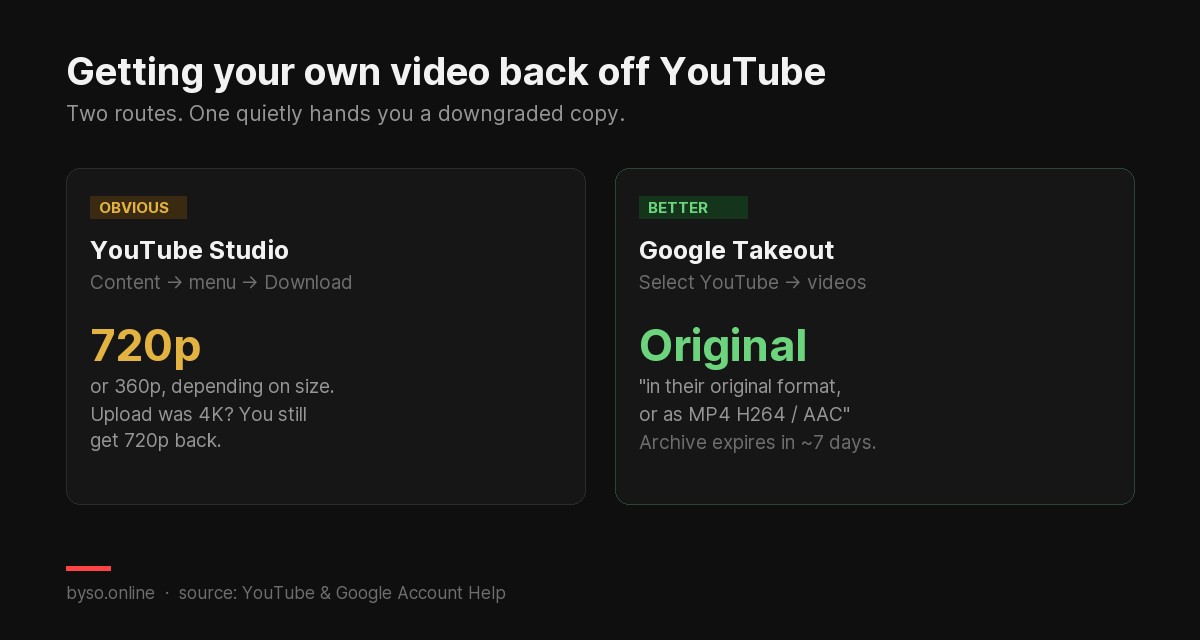
The short version: the obvious route is the wrong one. YouTube Studio's download button returns 720p or 360p no matter what you uploaded. Google Takeout can return the original file. If you plan to re-edit, re-upload or cut Shorts from an old video, that difference decides whether your footage survives.
The situation is always the same. The drive died, the laptop got replaced, the project folder is gone — and the only surviving copy of your video is the one on your own channel. You open Studio, find the download option, and get the file back.
What almost nobody notices is that the file you get back is not the file you uploaded.
1The Studio button quietly downgrades your video
YouTube's help page is unambiguous about what that button gives you:
That's the ceiling, and your original upload doesn't change it. Shot and uploaded in 4K? The button hands you 720p. Uploaded a crisp 1080p master? Same answer.
Worse, this file has already been through YouTube's encoder once. Re-upload it and it gets encoded again — a second generation of compression on top of the first. That's how a channel ends up with a re-uploaded video that looks visibly softer than the original, with no obvious explanation.
For a quick reference copy, none of this matters. For anything you intend to publish again, it matters a lot.
2Google Takeout returns the original
Takeout is Google's data export tool, and it treats your uploads differently. Google's documentation states:
Note the "or" — Google isn't promising a byte-identical original in every case. But this is the only route that can hand back the file you uploaded, and in practice it's what you want when the footage has to survive another edit.
How to do it
- Open Google Takeout while signed in to the account that owns the channel.
- Deselect everything first, then select YouTube only — otherwise you're exporting your whole Google account.
- Inside the YouTube entry, narrow it to videos if you don't need comments, playlists and history.
- Choose the largest archive size offered so the export isn't chopped into many parts.
- Request it and wait for the email.
Brand account warning: if your channel is a Brand Account, you may need to switch accounts before your videos appear in the export. This is the single most common reason people report that "Takeout didn't include my videos".
3The catches worth knowing before you start
| Catch | What it means for you |
|---|---|
| The archive expires in about 7 days | Don't request it and forget. Download it while it's live or request a fresh one. |
| Each archive can be downloaded 5 times | Enough for retries, not enough to treat as permanent storage. |
| Export takes minutes to days | Google says most people get the link the same day, but a channel with hundreds of videos is not a same-hour job. |
| Large exports get split | Choosing the biggest size limit reduces the number of parts you have to reassemble. |
None of this is a reason to avoid Takeout. It's a reason not to leave it until the afternoon you actually need the file.
The real lesson: both routes are recovery, not backup. Neither is a substitute for keeping your own masters. If this article is relevant to you right now, the next thing to fix is where your originals live.
4Other people's videos: where the line is
Worth stating plainly, because it's the question underneath most searches on this topic. YouTube's own help page says it directly:
YouTube's terms only permit downloading through features YouTube itself provides. Two of those exist:
- Premium offline viewing saves videos for playback inside the YouTube app. It's a cached video for watching without a connection, not a file you can pull out and edit.
- Creative Commons. Some creators publish under a CC licence, which permits reuse on that licence's terms — normally including attribution. If you need footage you're allowed to build on, this is the legitimate path.
Third-party "rippers" sit outside all of this, and the legal picture around them is genuinely contested rather than settled — courts in the US and Germany have ruled against such services. We're not going to pretend that's a grey area worth wandering into.
5You have the file. Now what?
The most common reason creators dig out an old upload isn't nostalgia — it's that the video still has value and the format has moved on. A 20-minute video from two years ago holds four or five good vertical clips.
If that's your plan, two things decide whether the clips get watched, and neither is the footage: the cover frame and the first two seconds. Our Shorts cover specs cover the sizing, and you can check how a cover holds up in a real feed before publishing.
Re-cutting an old video? BYSO writes a fresh title, description and tags from the video itself, and generates click-ready covers in 16:9 or 9:16 — so the re-upload isn't just the old thing again.
Try BYSO free →FAQ
Can I download my own YouTube videos?
Yes — through Studio's download option or Google Takeout. You can't download other users' videos through either; YouTube's help page says so plainly.
Why is my downloaded video only 720p?
Because that's the documented cap: Studio returns 720p or 360p depending on video size, regardless of what you uploaded. Use Takeout if you need the original.
How do I get original quality back?
Google Takeout. Its documentation says videos come in their original format, or as MP4 with H264 video and AAC audio — the only route that can return your upload.
How long does Takeout take?
Google says minutes to days depending on account size, and that most people get the link the same day. The archive then expires in about 7 days and allows 5 downloads.
Takeout didn't include my videos — why?
The usual cause is a Brand Account: switch to the account that actually owns the channel and request the export again.
Next: if you're re-uploading or re-cutting, run the result through our free video SEO checker — it flags the chapter rules that fail silently and shows what YouTube's documented limits actually are.