YouTube Shorts Thumbnail Size 2026: Specs, Safe Zone & What YouTube Won't Tell You
Quick answer: design your Shorts thumbnail vertical at 1080×1920 px (9:16), save it as JPG or PNG, keep it under 2 MB so it works from any device, and keep faces and text in the central safe zone. That covers every case. The details — and the part where YouTube's own documentation contradicts itself — are below.
The spec table
Two columns on purpose. YouTube publishes detailed requirements for long-form thumbnails but has not published Shorts-specific ones, so half of any honest spec list is a practical recommendation rather than a rule:
| Spec | What YouTube states | What to actually do |
|---|---|---|
| Aspect ratio | 16:9 (on the general thumbnail page, written for long-form) | 9:16 vertical — matches the Short |
| Resolution | Not specified for Shorts | 1080×1920 or larger |
| Formats | JPG, PNG, GIF | JPG or PNG |
| Max file size | 2 MB mobile · 50 MB desktop | Stay under 2 MB — works everywhere |
| Custom image upload | Partner Program, desktop (rolling out) | If you don't have it, embed your cover as a frame |
| A/B testing | Not available for Shorts | Pick your best; no split test to lean on |
Why 9:16 when the docs say 16:9
This trips up nearly everyone. If you search for thumbnail specs you land on YouTube's thumbnail help page, which says 1280×720, 16:9, up to 4K. Those numbers are correct — for regular videos. That page predates Shorts thumbnails and hasn't been rewritten for them.
A Short is a vertical 9:16 video. Put a 16:9 image in a vertical slot and you get one of two bad outcomes: bars around your artwork, or a centre crop that eats most of your composition. Design vertical and the problem disappears.
The same page also documents a related behaviour worth knowing: vertical videos with 16:9 custom thumbnails get replaced by an auto-generated 4:5 crop on home, explore and subscriptions. In other words, YouTube itself will re-crop a horizontal image rather than show it as you made it.
Documentation vs reality — July 2026YouTube announced custom Shorts thumbnails on 24 July 2026, and the rollout began the next day. As of this writing the official help page still says custom uploads aren't supported for Shorts, and still says the frame you pick can't be changed after uploading — both are now out of date.
In practice: you can change a Shorts thumbnail after publishing from desktop Studio, and Partner Program channels can upload a custom image. If a guide quotes the help page at you, check the date on it.
The safe zone: design for a grid, not a screen
Here's the part that actually changes how you design, and it follows from one fact: the Shorts thumbnail is never shown in the swipeable Shorts feed. That feed plays video instantly. Your thumbnail appears on your channel homepage, your channel's Shorts tab, the YouTube homepage and in search.
Every one of those is a small card in a dense grid — roughly 150 px wide on a channel page, smaller in search. You are not designing a full-screen poster. You are designing a thumbnail that has to survive at the size of a postage stamp, next to a dozen others.
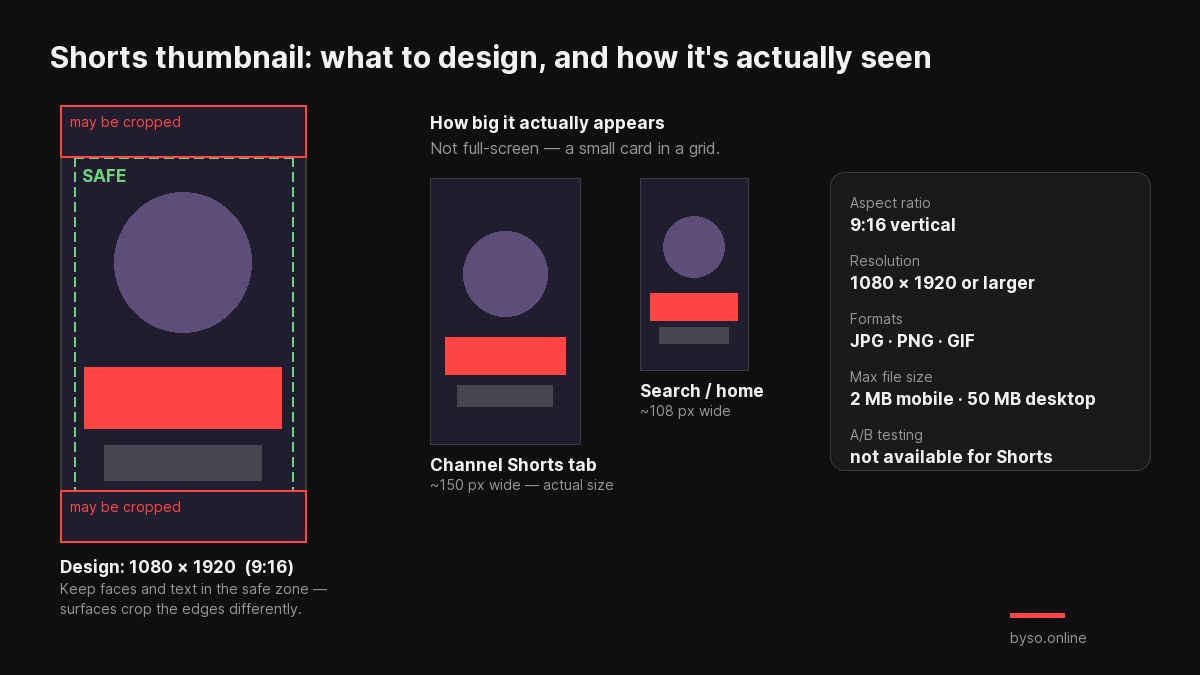
Practical rules that fall out of this:
- Keep faces and text within the central ~76% vertically. Top and bottom edges are the first thing surfaces crop.
- Fewer, bigger elements. At 150 px wide, a face and three words is the realistic budget.
- Check it in a grid, not alone. A cover that looks great full-size can vanish among neighbours — that's the whole point of comparing before you publish.
Drop your cover into a real YouTube Shorts grid and see whether it survives — free, no sign-up, your image never leaves your browser.
Check it in the real feed →Which specs apply to which method
There are now three ways to set a Shorts thumbnail, and the requirements aren't identical:
| Method | Where | What matters |
|---|---|---|
| Upload a custom image | Desktop Studio, Partner Program | Your file: 9:16, 1080×1920+, under 2 MB |
| Pick one of three suggested frames | Desktop Studio | Nothing to prepare — but you're limited to three options |
| Scrub to any frame | YouTube mobile app | Resolution equals your video's; a sharp, well-lit frame is everything |
If you can't upload yet, the workaround is to make the frame be your cover: design the 9:16 image, place it as the last second of the Short, then select it in the picker. Full walkthrough in our guide on adding a thumbnail to YouTube Shorts.
Common mistakes
- Exporting 1280×720 out of habit. That's the long-form spec; vertical needs 1080×1920.
- Filling the whole frame edge to edge. The top and bottom are the crop-prone zones.
- Designing at full size and never zooming out. Judge it at ~150 px, which is how it will actually be seen.
- Expecting it to lift views in the Shorts feed. It won't appear there at all — it shapes your channel and search presence.
- Trusting an undated spec article. After the July 2026 change, anything written earlier is describing a different product.
FAQ
What size should a YouTube Shorts thumbnail be?
1080×1920 px, vertical 9:16, matching the Short itself. Keep faces and text in the central area — surfaces crop the edges differently.
What is the aspect ratio for a Shorts thumbnail?
9:16. The 16:9 figure you'll find in YouTube's help is written for long-form videos; in a vertical slot it produces bars or a bad crop.
What's the maximum file size?
2 MB from mobile, 50 MB from desktop. JPG, PNG and GIF are accepted. Staying under 2 MB keeps you compatible everywhere.
Can I change a Shorts thumbnail after publishing?
Yes — from desktop YouTube Studio. The mobile app lets you re-pick a different frame. YouTube's older help text calling the choice permanent hasn't been updated.
Can I A/B test Shorts thumbnails?
No. Test & Compare covers up to three variants for long-form videos only.
Does the thumbnail show in the Shorts feed?
No. It appears on your channel homepage, your Shorts tab, the YouTube homepage and in search — the places where people browse rather than swipe.
Need the cover itself? Describe it, add your own photo, pick from 29 styles — vertical 9:16 in about a minute.
Make a 9:16 cover →