Shorts Thumbnail Not Showing or Won't Change? Every Cause, Fixed
Start here: in most cases nothing is broken. Shorts thumbnails are never shown in the swipeable Shorts feed — that feed plays video the instant it appears. If you set a thumbnail and then "checked" by swiping the feed, you were looking at the one place it can't be. Check your channel's Shorts tab instead. If it's missing there too, work through the causes below.
1You're checking the wrong place
This is the single most common reason people conclude their Shorts thumbnail is broken, and almost no guide says it plainly.
The thumbnail exists to represent your Short where people are browsing, not swiping. In the vertical feed itself there is nothing to represent — the video is already playing.
YouTube's help page names the surfaces explicitly: the frame you pick becomes "the thumbnail that appears in search results, hashtag and audio pivot pages, and your channel page." In practice you'll also see it on the Shorts shelf on the YouTube homepage, which that list doesn't mention. The Shorts feed appears on neither list, official or observed.
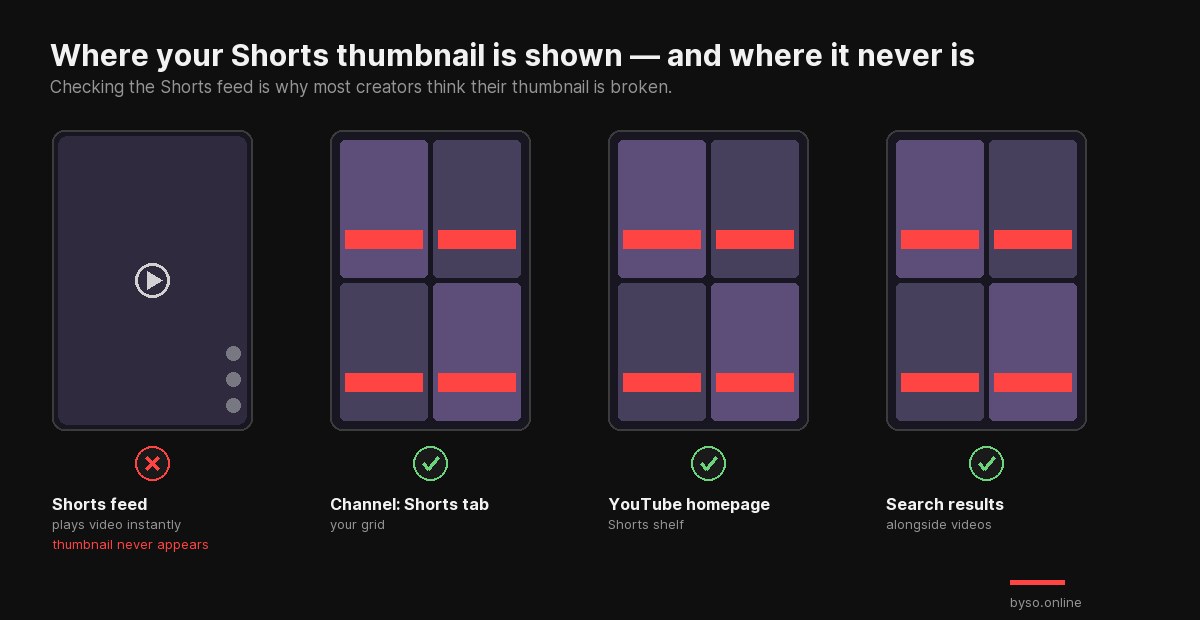
Fix: open your channel → Shorts tab, ideally in a private window so you see what a visitor sees. That's the real test.
2"For now, you can't change the thumbnail on your Short"
If YouTube shows you this message, the feature simply hasn't reached your account yet. It is not something you did wrong and there is no setting to flip.
Context: custom Shorts thumbnails were announced on 24 July 2026 and started rolling out the next day — to YouTube Partner Program channels, on desktop, expanding to more creators over time. Before that, Shorts thumbnails were frame-only.
Fix: try desktop YouTube Studio (Content → your Short → thumbnail section) even if mobile refuses. If the option isn't there either, your channel is still waiting on the rollout — use method 4 below, which works for everyone today.
3There's no upload button at all
Three separate gates control this, and any one of them removes the button:
| Gate | How to check |
|---|---|
| Not in the Partner Program | Custom Shorts uploads started with YPP channels — confirmed in YouTube's announcement. Note the entry bar doubles on 1 February 2027 |
| Using mobile | Upload is desktop-only; the phone offers frames |
| Channel not verified | YouTube Studio → Settings → Channel → Feature eligibility |
Fix: verify the channel anyway — it's free and takes a minute. YouTube requires verification to upload custom thumbnails in general; it hasn't published separate requirements for Shorts uploads, so treat this as the baseline rather than a documented Shorts rule.
4You can't upload yet — but you still want a designed cover
There's a method that has worked for every channel since long before the rollout, and still does: make your cover one of the video's frames. Design a 9:16 image, drop it in as the last second of the Short, upload, then select that frame in the picker.
Fix: full walkthrough in our guide on adding a thumbnail to YouTube Shorts. It's the reliable route while the rollout is still partial.
5You changed it, but the old one still shows
A thumbnail change isn't instant: YouTube processes it, and the surfaces that display it cache on top of that. YouTube doesn't publish a processing time, but in practice it's typically minutes rather than hours. Your own device is the worst place to judge — it holds the old image longest.
Fix: give it half an hour, then check in a private window or on a different device. Don't re-upload repeatedly in the meantime; it doesn't speed anything up.
6It shows on your channel but not in search
Different surfaces refresh on different schedules. The channel page usually updates first; search results and the homepage shelf can lag by hours. Nothing is wrong — it's propagation, not a failure.
7It looks cropped, zoomed or has bars
Nearly always an aspect-ratio problem: a 16:9 image in a 9:16 slot. YouTube's general thumbnail page recommends 16:9 because it was written for long-form videos, and people follow it for Shorts.
Fix: design vertical at 1080×1920 and keep faces and text in the central safe zone — the edges are what surfaces crop. Details and a safe-zone diagram in our Shorts thumbnail size guide.
8It's there, but blurry or unreadable
Two different causes worth separating. If you picked a frame, you probably caught motion blur — scrub to a still moment with the subject in focus. If you uploaded an image, it's resolution: anything under 1080 px wide gets soft when YouTube scales it.
There's also a third possibility that isn't a defect at all: the cover is fine full-size but illegible at the size it actually appears — roughly 150 px wide in your channel grid. That's a design problem, not a technical one.
Not sure which it is? Drop your cover into a real YouTube Shorts grid and see it at true size, next to actual competitors — free, no sign-up.
Check it in the real feed →Quick diagnosis table
| Symptom | Most likely cause |
|---|---|
| Not visible in the Shorts feed | Working as intended — it never appears there |
| "You can't change the thumbnail" message | Rollout hasn't reached your channel |
| No upload button | Unverified channel, not in YPP, or you're on mobile |
| Old thumbnail still showing | Processing + cache; wait 30 min, check incognito |
| On channel but not in search | Normal propagation lag |
| Cropped or bars | 16:9 image in a 9:16 slot |
| Blurry | Motion-blurred frame, or image under 1080 px wide |
One thing to ignore
If you find a guide quoting YouTube's help page to prove that Shorts can't have custom thumbnails, or that the frame you pick is permanent — that page is out of date. At the time of writing it still says both, months after the announcement that reversed them. Check the date on any advice about this.
FAQ
Why is my Shorts thumbnail not showing?
Usually because you're looking at the Shorts feed, where thumbnails never appear. YouTube shows it in search, on hashtag and audio pages and on your channel page. If it's missing there too, it's processing delay or cache.
Why does YouTube say I can't change the thumbnail on my Short?
The rollout hasn't reached your channel. Custom uploads went to Partner Program channels on desktop from late July 2026 and are still expanding. Try desktop Studio; otherwise pick a frame in the mobile app.
How long does a Shorts thumbnail take to update?
YouTube doesn't publish a figure; in practice minutes rather than hours, plus cache on top. Check in a private window before deciding it failed.
Why is there no upload button?
Custom upload needs a verified channel, is desktop-only, and started with Partner Program channels. You can still pick any frame in the mobile app.
Why does my thumbnail look cropped?
You used a 16:9 image in a vertical slot. Design 1080×1920 and keep the important parts centred.